Portable Wi-Fi hotspot : The portable internet solution
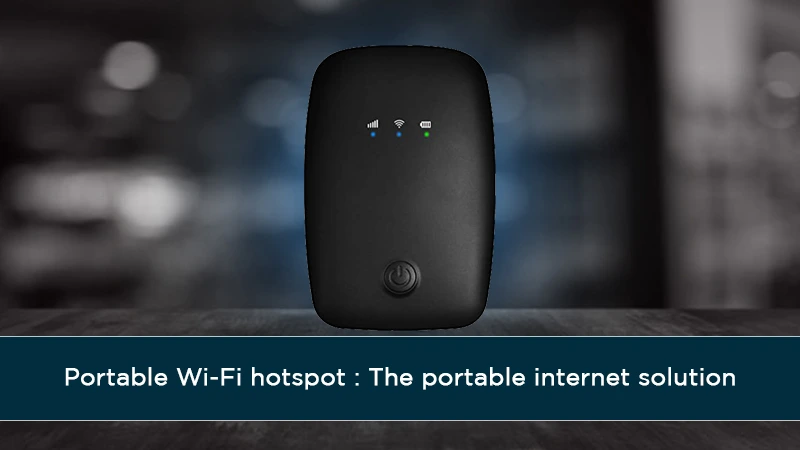
Unlock seamless connectivity wherever life takes you with a portable Wi-Fi hotspot, the ultimate portable internet solution. Discover how these compact devices can transform your travel, work, and daily life by providing reliable internet access on demand, eliminating the frustration of dead zones and expensive data roaming charges.
What is a Portable Wi-Fi Hotspot?
A portable Wi-Fi hotspot, often referred to as a mobile hotspot or MiFi device, is a compact, battery-powered gadget that creates a personal Wi-Fi network. It achieves this by connecting to a cellular data network (like 4G LTE or 5G) and then broadcasting that connection wirelessly, allowing multiple devices such as smartphones, laptops, tablets, and smartwatches to access the internet. Essentially, it acts as a bridge between the cellular network and your personal devices, offering a dedicated and secure internet connection wherever you have a cellular signal.
How Portable Wi-Fi Hotspots Work
The underlying technology of a portable Wi-Fi hotspot is quite ingenious. These devices contain a SIM card, much like a smartphone, which registers them with a mobile network operator. When activated, the hotspot searches for the strongest available cellular signal. Once a connection is established, it uses its internal modem to download and upload data. This data is then relayed via Wi-Fi to any connected devices within its range. The device essentially transforms a cellular data connection into a localized Wi-Fi zone. For instance, if you're in a remote area with no public Wi-Fi but have a strong 5G signal, your portable hotspot can provide internet access for your entire group.
The process can be broken down into these key steps:
- Cellular Connection: The portable hotspot uses its integrated cellular modem and SIM card to connect to the nearest cell tower, accessing the internet via the mobile carrier's network.
- Data Reception: It receives and processes the internet data from the cellular network.
- Wi-Fi Broadcasting: The device then emits a Wi-Fi signal, creating a personal network.
- Device Connection: Your smartphones, laptops, and other Wi-Fi-enabled devices can detect this network and connect to it, usually by entering a password provided by the hotspot.
- Data Sharing: Once connected, your devices can access the internet through the hotspot's cellular connection.
This functionality is crucial for modern connectivity needs, especially as public Wi-Fi can be unreliable or insecure. In 2025, with the continued expansion of 5G networks, the speeds and reliability offered by portable hotspots are more impressive than ever.
Types of Portable Internet Solutions
While the term "portable Wi-Fi hotspot" often refers to dedicated devices, the concept of portable internet extends to other solutions as well. Understanding these distinctions helps in choosing the most suitable option for your specific requirements.
Mobile Hotspots vs. Personal Hotspots
The terms "mobile hotspot" and "personal hotspot" are frequently used interchangeably, leading to some confusion. Generally:
- Mobile Hotspot (Dedicated Device): This refers to a standalone, portable device specifically designed to create a Wi-Fi network from a cellular signal. These devices are often called MiFi devices or pocket Wi-Fi. They typically have their own battery, SIM card slot, and Wi-Fi broadcasting capabilities.
- Personal Hotspot (Smartphone Feature): This is a feature built into most modern smartphones. When enabled, your smartphone uses its cellular data connection to create a Wi-Fi network that other devices can connect to. It effectively turns your phone into a temporary mobile hotspot.
The primary difference lies in their purpose and design. Dedicated mobile hotspots are built solely for sharing internet, often offering better battery life and more robust features. Smartphones, while capable, use their battery for multiple functions, which can drain it faster when acting as a hotspot.
Dedicated Mobile Hotspots vs. Smartphones
Let's delve deeper into the comparison between dedicated mobile hotspots and using your smartphone as a personal hotspot.
| Feature | Dedicated Mobile Hotspot | Smartphone Personal Hotspot |
|---|---|---|
| Primary Function | Creating a Wi-Fi network from cellular data. | Communication (calls, texts, apps), with Wi-Fi hotspot as a secondary feature. |
| Battery Life | Generally longer, designed for extended use as a hotspot. Some models offer 10-24 hours of continuous use. | Can be significantly shorter as the phone's battery powers the screen, apps, and cellular modem simultaneously. |
| Number of Connected Devices | Typically supports more devices (e.g., 10-30), offering more robust Wi-Fi capabilities. | Usually supports fewer devices (e.g., 5-10), and performance can degrade with more connections. |
| Network Performance | Often optimized for stable data sharing, sometimes with better antenna design for signal reception. | Performance can vary greatly depending on the phone model and its current operating state. |
| Data Usage Management | Dedicated devices often have better tools for monitoring and managing data usage. | Data usage is tied to your phone plan, and monitoring can sometimes be less intuitive. |
| Cost | Requires upfront purchase of the device plus a separate data plan. | Utilizes your existing smartphone data plan, but may incur extra charges or data caps for hotspot usage depending on the carrier. |
| Security | Offers robust WPA2/WPA3 encryption and password protection. | Offers similar encryption but can be less secure if the phone's overall security is compromised. |
| Ease of Use | Designed for simplicity; often just requires powering on and connecting. | Requires enabling the feature in settings, which can be a few more steps. |
In 2025, the capabilities of both are advancing. Dedicated hotspots are seeing improvements in 5G integration and battery technology, while smartphone hotspot features are becoming more efficient. For heavy users or those needing to connect multiple devices reliably, a dedicated mobile hotspot often presents a more robust solution.
Key Features to Consider in a Portable Wi-Fi Hotspot
Selecting the right portable Wi-Fi hotspot involves evaluating several critical features to ensure it meets your connectivity needs. Here’s a breakdown of what to look for in 2025-26:
Cellular Network Compatibility
This is paramount. Ensure the hotspot supports the cellular bands and technologies used by your preferred mobile carrier in the regions you frequent. For optimal performance in 2025, look for devices that support 4G LTE and, increasingly, 5G. Some devices are unlocked, allowing you to use SIM cards from any compatible carrier, offering greater flexibility. Others are locked to a specific carrier. Check the device specifications against your carrier's network coverage maps.
Data Plans and Pricing
Portable hotspots require a data plan, which can be purchased from mobile carriers or specialized mobile hotspot providers. Plans vary significantly in data allowances (e.g., 10GB, 50GB, unlimited), cost, and contract terms. Consider whether you need a prepaid plan for occasional use or a monthly subscription for regular access. In 2025, unlimited plans are becoming more common, but often come with speed throttling after a certain data threshold. Carefully compare pricing structures, data caps, and potential overage fees.
Battery Life
If you're often away from power sources, battery life is a critical factor. Look for devices that can last a full day of use on a single charge. Many modern hotspots offer 10-24 hours of continuous operation. Some even support fast charging or can be powered via USB, allowing you to recharge from a power bank or laptop. For extended trips, consider a model with a removable battery that can be swapped out.
Number of Connected Devices
How many devices will you typically connect simultaneously? Most portable hotspots can handle between 5 and 30 devices. If you're traveling solo or with one other person, a device supporting 10 devices might suffice. For a family or a small group, opt for a model that can comfortably support 20 or more devices without significant performance degradation. This ensures everyone can stay connected without compromising speed.
Security Features
Your portable Wi-Fi network should be secure. Look for devices that support robust encryption protocols like WPA2 or WPA3. A strong, customizable password is also essential. Some advanced hotspots offer features like a firewall, VPN support, or the ability to create a guest network, providing an extra layer of security for your connected devices. In 2025, WPA3 is becoming the standard for enhanced security.
Ease of Use and Portability
A good portable hotspot should be simple to set up and operate. Look for intuitive interfaces, clear instructions, and easy Wi-Fi password management. The device should also be compact and lightweight, easily fitting into a pocket, bag, or purse. Some models feature small touchscreens for quick access to settings, while others rely on a companion app for management.
Speed and Performance
The internet speed you experience will largely depend on the cellular network coverage and the hotspot's capabilities. For 2025, prioritize devices that support 5G if available in your area, as this offers significantly faster download and upload speeds compared to 4G LTE. Also, consider the Wi-Fi standard supported (e.g., Wi-Fi 5 or Wi-Fi 6) for optimal performance within the local network. Read reviews to gauge real-world performance metrics.
Benefits of Using a Portable Wi-Fi Hotspot
Portable Wi-Fi hotspots offer a compelling array of advantages for anyone who needs reliable internet access away from home or office. These benefits are becoming even more pronounced in our increasingly connected world of 2025.
Staying Connected on the Go
The most obvious benefit is uninterrupted internet access. Whether you're commuting, traveling, working remotely from a coffee shop, or exploring new destinations, a portable hotspot ensures you're always online. This is invaluable for checking emails, attending virtual meetings, navigating, or simply staying in touch with loved ones. For instance, a traveler in a rural area without hotel Wi-Fi can still conduct business or share their experiences in real-time.
Cost Savings
Compared to expensive international roaming charges or relying on unreliable public Wi-Fi networks, a portable hotspot can be a more cost-effective solution. By purchasing a local SIM card or a specific data plan for your hotspot, you can often secure unlimited or high-data allowances at a fraction of the cost of roaming. This is particularly true for extended trips or frequent international travel. For businesses, providing portable hotspots to employees can be more economical than reimbursing them for expensive roaming bills.
Enhanced Productivity
For remote workers, freelancers, and business professionals, a reliable internet connection is non-negotiable. A portable hotspot provides the stable and secure connection needed to be productive anywhere. This means you can participate in video conferences without dropouts, access cloud-based documents seamlessly, and meet deadlines without the frustration of intermittent Wi-Fi. A 2025 study by Global Workplace Analytics found that remote workers who have reliable internet access report higher job satisfaction and productivity.
Flexibility and Freedom
Portable hotspots grant you the freedom to work and connect from virtually anywhere. You're no longer tethered to a physical location with Wi-Fi. This flexibility allows for a more dynamic lifestyle, whether it's working from a scenic park, a different city each week, or simply having a backup internet source at home during an outage. The ability to create your own private network means you're not dependent on the availability or quality of public Wi-Fi.
Secure Internet Access
Public Wi-Fi networks, such as those found in cafes, airports, and hotels, are notoriously insecure. They are often unencrypted and can be easily monitored by malicious actors, putting your sensitive data at risk. A portable Wi-Fi hotspot creates a private, encrypted network with a password, significantly enhancing your online security. This is crucial for tasks like online banking, accessing confidential work documents, or making online purchases. In 2025, with increasing cyber threats, this security aspect is more important than ever.
Choosing the Right Portable Internet Solution for You
With various options available, selecting the ideal portable internet solution requires careful consideration of your personal usage patterns and needs. Here’s a step-by-step guide to help you make an informed decision in 2025.
Understanding Your Data Needs
The first step is to assess how much data you typically consume. Are you a light user who primarily checks emails and browses websites, or a heavy user who streams videos, participates in video calls, and downloads large files?
- Light Users: May find plans with 10-20GB of data per month sufficient.
- Moderate Users: Often require 30-60GB per month for a mix of browsing, streaming, and occasional video calls.
- Heavy Users: May need 100GB or more, potentially looking for "unlimited" plans (though always check for fair usage policies and throttling).
Evaluating Network Coverage
A portable hotspot is only as good as the cellular network it connects to. Research the coverage maps of mobile carriers in the areas where you'll be using the hotspot most frequently. If you travel internationally, investigate international roaming plans or options for purchasing local SIM cards in different countries. Some devices offer dual-SIM capabilities or eSIM support, which can simplify international connectivity. In 2025, 5G coverage is expanding, but 4G LTE remains the most widespread and reliable option in many areas.
Budget Considerations
Portable internet solutions involve two main costs: the device itself and the ongoing data plan.
- Device Cost: Dedicated mobile hotspots can range from $50 to $300 or more, depending on features and network capabilities (e.g., 5G models are typically more expensive).
- Data Plan Cost: Monthly plans can vary from $20 for limited data to $100+ for high-data or "unlimited" options. Prepaid plans offer flexibility but might be more expensive per GB.
Device Compatibility and Setup
Ensure the portable hotspot you choose is compatible with your operating systems and devices. Most modern hotspots use standard Wi-Fi protocols and are compatible with Windows, macOS, iOS, and Android. Setup should be straightforward, typically involving inserting a SIM card, powering on the device, and connecting your devices using the provided Wi-Fi name (SSID) and password. Some devices offer companion apps that simplify management, firmware updates, and data monitoring.
Real-World Scenarios and Case Studies
To truly appreciate the utility of a portable Wi-Fi hotspot, let's explore some common scenarios where they prove indispensable. These examples highlight how these devices solve real-world connectivity challenges in 2025.
The Digital Nomad Advantage
Scenario: Anya, a freelance web designer, works remotely from various countries. She needs a reliable internet connection for client meetings, uploading large design files, and research. Public Wi-Fi is often slow or insecure, and hotel Wi-Fi can be prohibitively expensive.
Solution: Anya uses an unlocked 5G portable Wi-Fi hotspot. Before traveling, she researches local SIM card providers or international data plans that offer good value. She inserts a local SIM upon arrival or activates her international plan. This allows her to create a secure, high-speed Wi-Fi network wherever she is, enabling her to work efficiently and maintain client communication without interruption. Her hotspot typically supports her laptop, tablet, and smartphone, all simultaneously.
Traveling Families and Connectivity
Scenario: The Miller family is on a road trip across the country. They need internet access for navigation, entertainment (streaming music and movies for the kids), and staying in touch with family back home. Relying solely on mobile data for multiple devices would quickly drain their phone plans and incur significant costs.
Solution: They bring a portable Wi-Fi hotspot with a generous monthly data allowance. The hotspot is placed in the car, providing a stable Wi-Fi connection for their phones, tablets, and even a portable gaming device. This keeps everyone entertained and connected, prevents unexpected data overage charges, and allows them to share photos and updates with ease. The long battery life ensures it can last through long driving days.
Business Professionals on the Move
Scenario: David, a sales executive, frequently travels for client meetings. He needs to access company databases, send urgent reports, and participate in video conferences from airports, hotels, and client offices that may have unreliable or no Wi-Fi.
Solution: David carries a portable Wi-Fi hotspot with a business-focused data plan. This ensures he has a secure and consistent internet connection for critical tasks. He can join a last-minute video call from a quiet corner of an airport lounge or quickly upload a proposal document after a client meeting, all without worrying about the security or availability of public Wi-Fi. The ability to connect multiple devices means his laptop and smartphone are always online.
Event Organizers and Temporary Connectivity
Scenario: A small conference is being held in a venue with limited Wi-Fi infrastructure. The organizers need to provide internet access for attendees, presenters, and on-site staff for registration, live streaming, and information dissemination.
Solution: Portable Wi-Fi hotspots (sometimes multiple units) are deployed to cover the event space. These devices can be quickly set up and provide immediate internet access, bypassing the need for complex and time-consuming wired network installations. This ensures smooth operation of registration systems, allows presenters to access online resources, and enables attendees to share their experiences on social media, enhancing the event's overall engagement.
Portable Wi-Fi Hotspot vs. Public Wi-Fi
The choice between using a portable Wi-Fi hotspot and relying on public Wi-Fi often comes down to security, reliability, and cost. In 2025, the advantages of a portable hotspot are becoming increasingly clear:
| Feature | Portable Wi-Fi Hotspot | Public Wi-Fi |
|---|---|---|
| Security | High (encrypted, password-protected, private network) | Low (often unencrypted, vulnerable to man-in-the-middle attacks, data snooping) |
| Reliability | High (dependent on cellular signal strength, consistent performance) | Variable (can be slow, unstable, overcrowded, or unavailable) |
| Availability | Good (wherever there's a cellular signal) | Limited (only in designated public locations) |
| Cost | Requires device purchase and data plan; can be cost-effective for frequent use. | Often free, but may have time limits, speed restrictions, or require personal information for access. Can lead to unexpected costs if relying on mobile data as a backup. |
| Performance | Generally consistent and predictable, especially with 5G. | Can be very slow due to many users or bandwidth limitations. |
| Privacy | High (your activity is not shared with the Wi-Fi provider) | Low (public Wi-Fi providers may collect and use your browsing data) |
While public Wi-Fi can be a convenient option for quick, non-sensitive tasks, for anything requiring security, reliability, or consistent performance, a portable Wi-Fi hotspot is the superior choice. The peace of mind knowing your connection is secure and consistently available is invaluable in today's digital landscape.
Future Trends in Portable Internet
The evolution of portable internet solutions is rapid, driven by advancements in cellular technology and user demand. As we look towards 2026 and beyond, several key trends are shaping the future of portable Wi-Fi hotspots:
- Ubiquitous 5G and Beyond: The continued rollout and improvement of 5G networks will mean faster speeds, lower latency, and greater capacity for portable hotspots. Future iterations might even leverage emerging 6G technologies for even more transformative connectivity.
- Enhanced Battery Technology: Expect further improvements in battery efficiency and charging speeds. Devices may offer multi-day usage on a single charge or integrate advanced power-saving modes.
- AI-Powered Optimization: Artificial intelligence could be used to dynamically manage network resources, optimize signal strength, and predict data needs, leading to more efficient and seamless user experiences.
- Integrated eSIM Technology: eSIMs (embedded SIMs) will become more prevalent, simplifying the process of switching carriers or plans without needing a physical SIM card. This is particularly beneficial for international travelers.
- Increased Device Integration: Portable hotspot functionality might become more deeply integrated into other devices, such as laptops, tablets, or even wearables, offering a more seamless, all-in-one connectivity solution.
- Focus on IoT Connectivity: As the Internet of Things (IoT) expands, portable hotspots may evolve to better support a wider range of connected devices, including smart home gadgets and industrial sensors, providing connectivity in remote or temporary locations.
- Sustainability: With growing environmental awareness, manufacturers may focus on more energy-efficient designs and sustainable materials for portable hotspot devices.
These advancements promise to make portable internet solutions even more powerful, accessible, and integral to our daily lives.
In conclusion, a portable Wi-Fi hotspot is no longer a niche gadget but a fundamental tool for modern connectivity. Whether you're a frequent traveler, a remote worker, or simply someone who values reliable internet access, these devices offer an unparalleled combination of convenience, security, and flexibility. By understanding the features, benefits, and available options, you can confidently choose a portable internet solution that keeps you connected, productive, and in control, no matter where your journey takes you in 2025 and beyond. Invest in your connectivity today and experience the freedom of the internet on your terms.
📚Read More Articles About Internet Providers

Choosing the Right Internet Plan in Los Angeles: A Comprehensive Guide
October 19, 2026
Best Prepaid Internet Providers & Plans
October 12, 2026
How to Get Cheap Internet in Texas That's Actually Reliable
September 7, 2026